I make all my Pinterest pins in Canva. Not the paid version — the free one. And after using it regularly to design pins for my blog, I can say this plainly: for most bloggers, the free version is genuinely enough.
This isn’t a list of features copied from Canva’s website. This is what I’ve actually found using free Canva in 2026.
What I Use Canva For
Mostly Pinterest pins. I search for a template, drop in elements, change the text and colors, and export. The whole thing takes minutes. Here’s what my workspace looks like while designing a pin around AI tools:
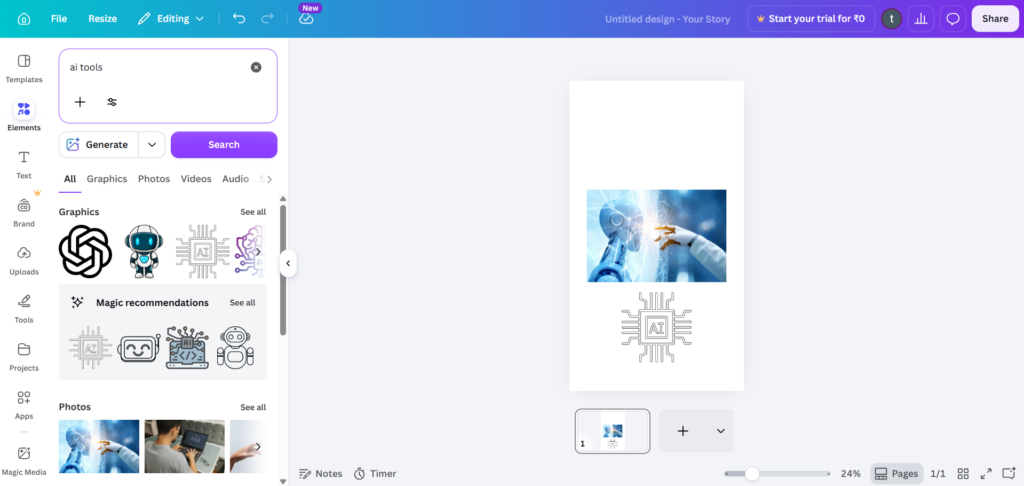
I searched “ai tools,” picked some graphics, and built a pin around them. No design skills needed.
Is It Easy to Use?
Yes — and this is Canva’s biggest strength. There’s almost no learning curve. If you can drag, drop, and type, you can make a professional-looking pin in your first session. For a complete beginner, nothing else comes close.
Free vs Paid — Do You Actually Need to Pay?
Honestly, no — not for normal use. I’ve stuck with the free version and it covers everything I need for daily Pinterest pins. You get thousands of templates, plenty of elements, and full design tools without paying anything.
There are some premium elements marked with a small crown — those need the paid plan. But there are so many free alternatives that I’ve never felt stuck. If you design heavily or want background remover and brand kit features, the paid plan helps. For everyday blogging, free Canva is enough.
Best For Pinterest Pins
If you make Pinterest pins, Canva is, honestly, the best tool there is. The pre-sized Pinterest templates, the easy text overlays, and the huge graphic library make it effortless to produce consistent, eye-catching pins every day. This alone makes it essential for any blogger using Pinterest for traffic.
My Honest Verdict
Easy to use, genuinely free for normal needs, and perfect for Pinterest pins. Canva’s free version is all most bloggers will ever need. Start free — you may never feel the need to upgrade.
Rating: 4.5/5 — the best free design tool for bloggers in 2026.